

WordPress appointment booking can be set up by installing a scheduling plugin, creating the appointment or service clients will book, setting your availability, connecting your calendar, and placing the booking form on your website. For the service-based WordPress sites I build, I use Fluent Booking because it is user-friendly and I can usually get a basic booking setup running in under ten minutes.
I have used Bookly, Booknetic, BookingPress, Calendly, and other booking systems on my own websites and client projects. That experience is why I no longer evaluate booking software based on how impressive the feature list looks.
I care about how quickly I can get it working, whether I can figure out where everything is without needing a treasure map, whether the client can manage it after I leave, and whether the plugin creates more problems than it solves.
For the service-based WordPress websites I build today, Fluent Booking is the only booking plugin I recommend.
Does WordPress Have a Built-In Appointment Booking System?
WordPress does not include a complete appointment scheduling system in its core software. To allow clients or customers to select available appointment times and book through the website, you need to add that functionality through a plugin or an external scheduling service.
This is why there are dedicated WordPress booking plugins in the first place.
For my builds, I prefer keeping appointment booking inside WordPress rather than sending the client into a separate scheduling platform whenever I can avoid it. Fluent Booking is a native WordPress appointment-scheduling plugin and runs inside the WordPress site.
That also answers one of the questions Google currently surfaces in People Also Ask:
Is there a WordPress plugin that can book appointments?
Yes. There are multiple WordPress appointment-booking plugins, including Fluent Booking, Bookly, Amelia, BookingPress, and others. The more important question is which one makes sense for the way the business actually operates.
That is the question that led me to Fluent Booking.
Why Do I Only Recommend Fluent Booking for WordPress Booking Systems?
I only recommend Fluent Booking for the service-based WordPress websites I build because it is the most user-friendly booking plugin I have personally used.
For a straightforward client setup, I can usually install the plugin, create the appointment, set the availability, connect the calendar or meeting platform, and get the basic booking workflow operational in under ten minutes.
That is not Fluent Booking’s marketing claim.
That is my experience from actually installing and configuring it.
There are certainly more complex booking setups that take longer. Multiple services, advanced automations, payment workflows, larger teams, specialized availability, or custom intake processes add more configuration.
But a normal service-based appointment calendar should not require me to sacrifice half of my fucking afternoon just to get somebody taking bookings.
Fluent Booking also currently supports unlimited calendars and hosts on its paid plans, multiple meeting types, availability management, Google Calendar, Google Meet, Stripe, Fluent Forms, FluentCRM, Zoom, and other integrations. Its current pricing structure lists all features as included across the paid license tiers, with the license level primarily determining the number of WordPress sites covered.
Those capabilities matter, but they are not the main reason I recommend it.
I recommend it because I actually like using it.
What Do You Need Before Setting Up WordPress Appointment Booking?
Before installing anything, decide what the booking workflow needs to do. The plugin becomes much easier to configure when you already know what the customer is booking and what needs to happen afterward.
For a typical service-based website, I determine:
- the appointment or service being offered
- how long the appointment lasts
- the days and hours it can be booked
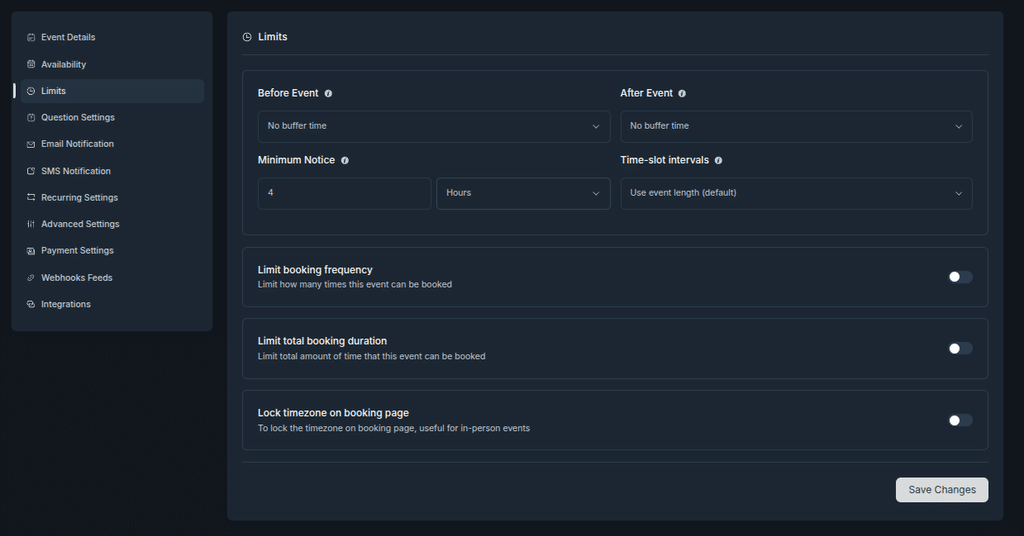
- whether buffer time is needed
- how far in advance someone can book
- whether the appointment is online, by phone, or in person
- whether a calendar needs to be synchronized
- whether a meeting link needs to be generated
- what information needs to be collected from the client
- whether payment is required
- who needs to receive booking notifications
This is one of those places where five minutes of thinking saves considerably more time later.
You do not want to finish the calendar and then realize your 60-minute session actually occupies 90 minutes because you need time before and after it.
Ask me how I know.
How Do You Install Fluent Booking in WordPress?
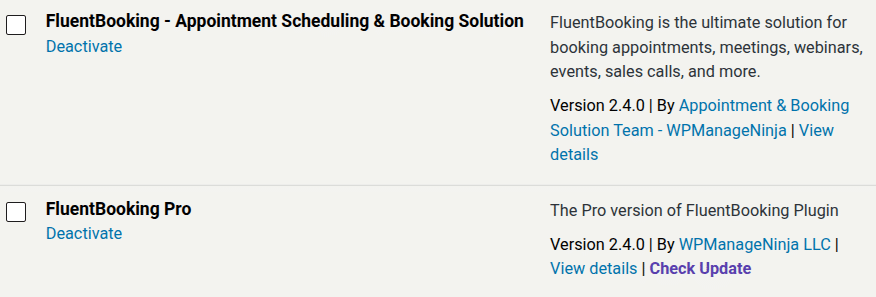
To install the free version of Fluent Booking, go to Plugins > Add New Plugin inside WordPress, search for Fluent Booking, install it, and activate it.
That process is verified in Fluent Booking’s current installation documentation.
If you are using Fluent Booking Pro, the current process is slightly different. You download the Pro ZIP file from your WPManageNinja account, upload it through Plugins > Add New Plugin > Search “Fluent Booking“, this is the free version then activate it. Pro can be installed on top of an existing free installation without losing the existing booking data.
For this walkthrough, I would use the version that matches the actual client workflow you are building.
How Do You Create an Appointment in Fluent Booking?
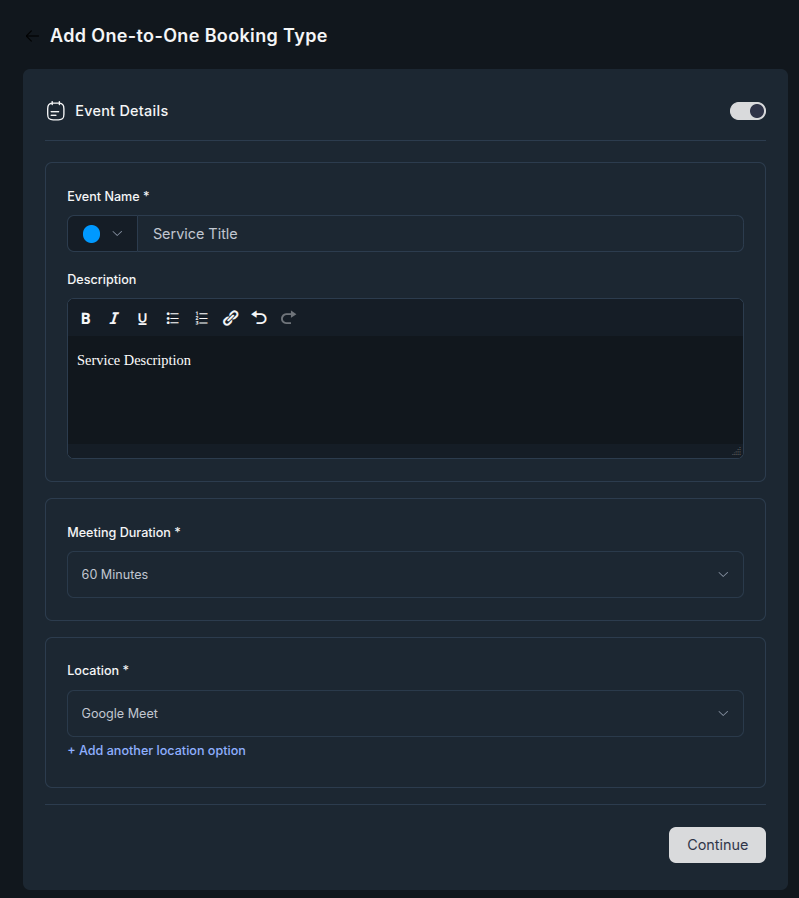
To create an appointment in Fluent Booking, create or select the host, create a new booking event, and define the event name, description, duration, and meeting location.
Fluent Booking’s current event editor then provides additional settings for availability, booking limits, questions, email notifications, advanced settings, payments, webhooks, and integrations.
This is one of the reasons I find the plugin easy to work with.
The appointment itself is treated as an event, and the settings connected to that event are logically grouped together.
For a normal client appointment, I usually start with the basics:
- event name
- description
- appointment duration
- meeting location
- availability
- booking questions
- notifications
Then I add anything else the particular business needs.
How Do You Set Availability in Fluent Booking?
To set availability in Fluent Booking, define the host’s available days and hours and then assign that availability to the appropriate booking event.
Fluent Booking currently allows reusable availability schedules with weekly hours and date overrides. Individual events can also use custom hours or an existing schedule and can limit bookings to a certain number of future days or a defined date range.
That means a normal weekly schedule does not have to be rebuilt for every appointment type.
For example, a consultant could have a regular schedule of Monday through Thursday from 10:00 AM to 4:00 PM and then block individual dates for holidays, travel, or other commitments.
The availability system is one of the areas I would show visually because it is easier to understand when you can actually see the interface.
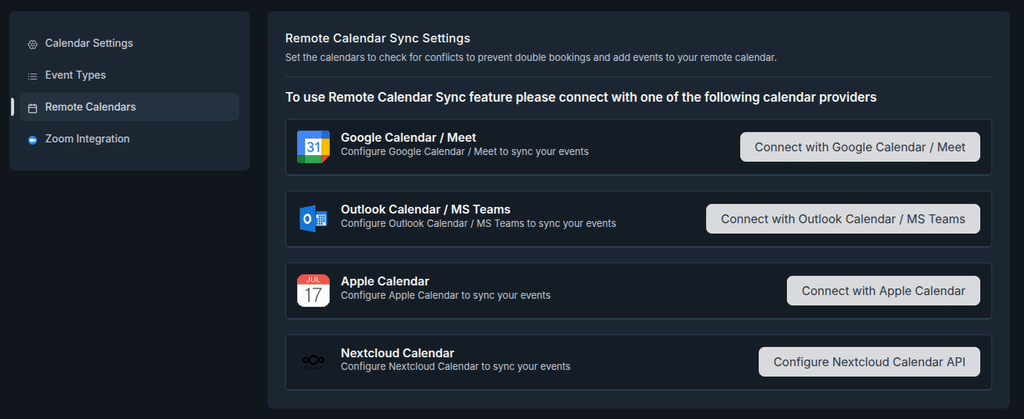
How Do You Connect Google Calendar and Google Meet?
Fluent Booking Pro can connect directly to Google Calendar and Google Meet using Fluent Booking’s verified Google app. Two-way Google Calendar synchronization and automatic Google Meet links are currently Pro features.
This was one of the first things I noticed when I started using Fluent Booking because I had been conditioned by other software to expect more bullshit.
With the default verified app, you select the host, connect the Google account, grant the requested permissions, and then choose the calendar and conflict-checking settings.
When I connected it the first time, I kept waiting for the part where it became complicated.
It didn’t.
Fluent Booking’s documentation also provides an option to build your own Google app, but it labels that method as not recommended for the normal setup.
You can also integrate, Zoom, MS Teams, Apple Calendar, NextCloud and more.
For the client sites I build, the verified connection is one of the reasons I can get the booking workflow running so quickly.
How Do You Add Fluent Booking to a WordPress Page?
Once the booking event is configured, Fluent Booking can display the booking form directly on the WordPress website.
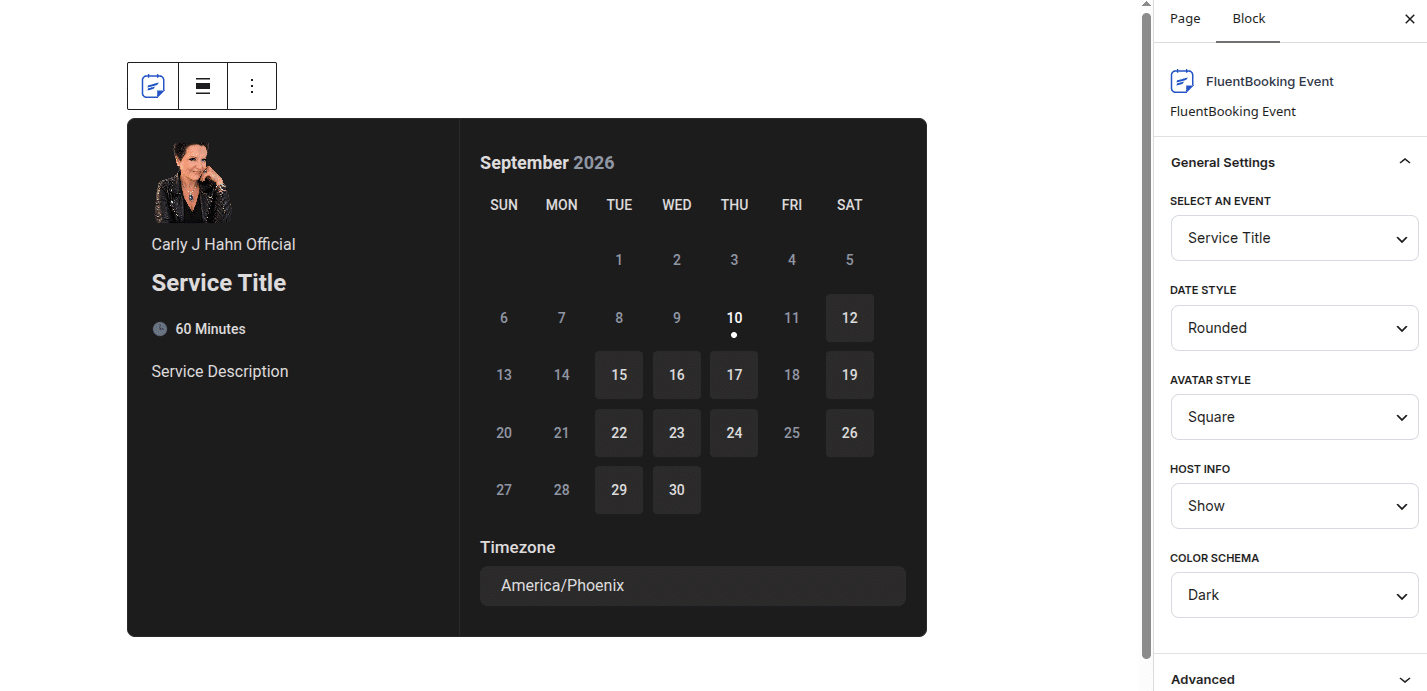
The current Fluent Booking documentation provides several front-end options, including a shortcode, a WordPress block, a standalone landing-page link, and generated booking links.
For most service-business websites I build, I prefer putting the booking experience on a dedicated page of the actual website.
The basic process is:
- Create a new page in Wordpress
- Add the Fluent Booking Block
- Choose your calendar (service)
- Add the booking calendar to the page.
- Publish or update the page.
- Test it from the front end.
At that point, the calendar may be visible. That does not mean I consider the job finished.
How Long Does WordPress Appointment Booking Take to Set Up?
For a basic service-based website, I can usually get WordPress appointment booking running with Fluent Booking in under ten minutes.
That generally means installing the plugin, creating the host and appointment event, setting the basic availability, connecting the calendar or meeting platform, and getting the booking calendar ready to use.
The under-ten-minute timeframe is based on my own repeated implementation experience. It is not a promise that every booking system takes ten minutes.
A larger team configuration, custom automations, payments, multiple appointment types, intake workflows, or unusual scheduling requirements can obviously take longer.
The distinction is that the basic setup itself is fast.
That matters to me because I build and maintain websites. Every unnecessary layer of configuration becomes time I have to spend setting something up, troubleshooting it later, explaining it to the client, or remembering where the hell some obscure setting lives six months from now.
User-friendly software has an operational value that is difficult to see on a feature-comparison table.
Does Fluent Booking Work With Multiple Staff Members?
Yes. Fluent Booking supports multiple staff members and team booking workflows.
I use it on a website where multiple people offer sessions, so this is functionality I have actually implemented.
Fluent Booking’s current pricing page lists unlimited hosts and unlimited calendars on its paid plans. Its team functionality includes round-robin events, where an available team member can be assigned to the booking, and collective bookings, where multiple hosts can participate in the same appointment.
Round robin and collective booking solve two different problems.
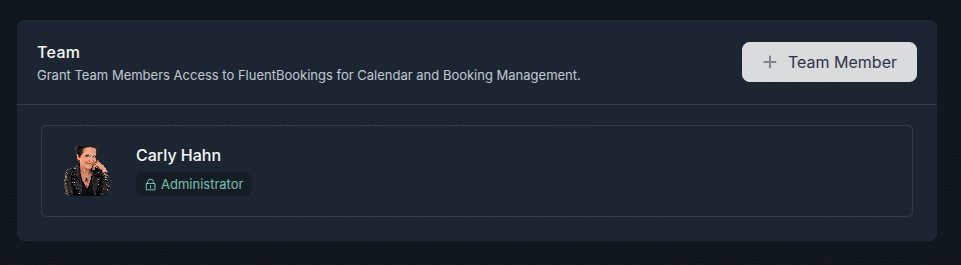
With round-robin booking, multiple hosts belong to the team and the booking can be distributed based on availability.
With collective booking, multiple hosts are assigned to the same meeting with one attendee. Fluent Booking can use either a common schedule or individual host schedules for collective events.
So multi-staff support is not a reason I would automatically move a service business to another booking plugin.
The better question is what type of team scheduling the business actually needs.
Can Fluent Booking Collect Information Before the Appointment?
Fluent Booking includes booking questions that collect information from the person scheduling the appointment. The event editor contains a dedicated Questions Settings area for configuring the information collected during booking.
For more complex form workflows, Fluent Booking Pro currently integrates with Fluent Forms. The integration allows a Fluent Booking event to be added directly to a Fluent Form, so the booking process can be combined with additional form fields and data collection.
That integration is useful when the appointment itself is only one part of a larger intake process.
And this is one area where we need to be precise:
The Fluent Forms integration is currently a Fluent Booking Pro feature.
I would not turn this section into an entire Fluent Forms tutorial because that is a separate implementation query and a stronger supporting article on its own.
What Should You Test Before a WordPress Booking System Goes Live?
Installing a booking plugin is not the same thing as implementing a working booking system.
Before I hand a booking setup to a client, I test the customer workflow and the administrative workflow myself.
I want to know what actually happens when a real person uses it, not just whether the WordPress dashboard says everything is configured.
I check things like:
- whether the correct dates and appointment times appear
- whether the time zone behaves correctly
- whether the booking can actually be completed
- whether the confirmation email arrives
- whether the booking appears on the connected calendar
- whether the meeting link is generated when one is required
- whether the correct staff member receives the appointment
- whether cancellation works
- whether rescheduling works
- whether payments work when the event is paid
- whether administrative notifications go to the correct person
- whether the booking page works properly on mobile
- whether the confirmation makes sense from the customer’s point of view
This is one of the major differences between explaining where the settings are and actually building booking systems for businesses.
A calendar appearing on a page proves that a calendar appeared on a page.
It does not prove the workflow works.
What Should You Check Before Handing Fluent Booking to a Client?
Before I consider a client booking system finished, I make sure the client can manage the things they are realistically going to need after the website launches.
That includes knowing where the bookings are, how to change availability, how to block dates, how to manage appointments, and what happens when someone books.
Fluent Booking’s current booking dashboard provides both list and calendar views and allows bookings to be sorted by host.
For a client handoff, I normally want the following questions answered:
- Who owns the connected calendar?
- Which staff members need access?
- Where will new appointments appear?
- Who receives booking notifications?
- How does the client change regular availability?
- How does the client block a specific date?
- How are cancellations handled?
- How are appointments rescheduled?
- What happens when an appointment requires payment?
- What does the customer receive after booking?
The exact handoff depends on the business, but this part matters.
If I build something that only I understand how to operate, I have not built a very useful client system.
Is Fluent Booking Easy for Non-Technical WordPress Users?
In my experience, yes. Fluent Booking is the most user-friendly WordPress booking plugin I have personally used.
That does not mean every possible configuration is one click or that nobody will ever need documentation. It means the core workflow makes sense to me, the main booking settings are organized logically, and I do not spend unnecessary time trying to figure out how to perform basic scheduling tasks.
Fluent Booking itself states that coding skills are not required, but my recommendation is not based on that marketing statement.
My conclusion comes from using it.
That distinction matters.
Why I Use Fluent Booking for WordPress Appointment Booking
For WordPress appointment booking on service-based websites, Fluent Booking is currently the only plugin I recommend.
I have used other booking systems. I changed what I recommend because my experience changed.
Fluent Booking is quick for me to configure, easy to navigate, capable of handling individual and team scheduling, and able to connect with the other parts of the WordPress business when the workflow becomes more complex.
Its current integrations include Google Calendar and Meet, Outlook, Apple Calendar, Nextcloud, Zoom, FluentCRM, Fluent Forms, FluentBoards, webhooks, payment tools, and other automation and workflow options.
But again, the feature list is not my primary reason for using it.
The short answer is much simpler.
It is very fucking user-friendly.
I can get in, build what the client needs, test it, and move on.
After years of working with websites and booking software, I value that a hell of a lot more than a giant feature table.
If my experience changes, my recommendation can change with it.
Right now, this is what I use.
Frequently Asked Questions
Does Fluent Booking Have Conditional Fields?
No. Fluent Booking does not currently have native conditional logic for its booking questions, so you cannot show or hide booking fields based on a previous answer directly inside the standard Fluent Booking form.
There is a good workaround, though. Fluent Booking Pro integrates with Fluent Forms, and the Fluent Booking field inside Fluent Forms can use conditional logic. That allows you to build a more advanced intake form where fields appear or disappear based on the client’s answers while still handling the actual appointment through Fluent Booking.
Can Fluent Booking Collect Custom Questions Before an Appointment?
Yes. Fluent Booking lets you add custom booking questions to an event and currently supports fields including text, textarea, number, phone, dropdown, multi-select, custom date, hidden fields, terms and conditions, and file uploads with Fluent Booking Pro. Name and email remain required system fields.
Custom booking questions work well for straightforward intake information. If the intake needs conditional logic or a more complex form workflow, I use Fluent Forms Pro with Fluent Booking instead.
Can Fluent Booking Be Used for Multiple Staff Members?
Yes. Fluent Booking Pro supports two-way Google Calendar synchronization and Google Meet integration. Once connected, the booking calendar can check for scheduling conflicts and automatically create Google Meet links for appointments.
I use this integration because the connection is quick and does not require the kind of complicated Google setup I have dealt with in other software. This is one of my favorite features in a WordPress Appointment Booking Plugin.
Can I Add Fluent Booking Directly to a WordPress Page?
Yes. Fluent Booking can be displayed directly on a WordPress page using its booking block or shortcode, and individual booking events can also be shared with direct booking links. This lets the customer complete the booking without being sent to a separate scheduling website.
For client sites, I usually keep the booking experience directly on the website whenever that makes sense.
Related Reading
If you are still deciding which booking plugin to use, read my guide to the best WordPress booking plugin, where That article explains how I evaluate booking plugins based on actual implementation, cost, setup, integrations, flexibility, and long-term use.
Affiliate Disclosure: This article contains affiliate links. If you purchase Fluent Booking through my link, I may earn a commission at no additional cost to you. I recommend software based on what I actually use, configure, and would choose for my own websites or client builds. Affiliate commissions do not determine the recommendation.