


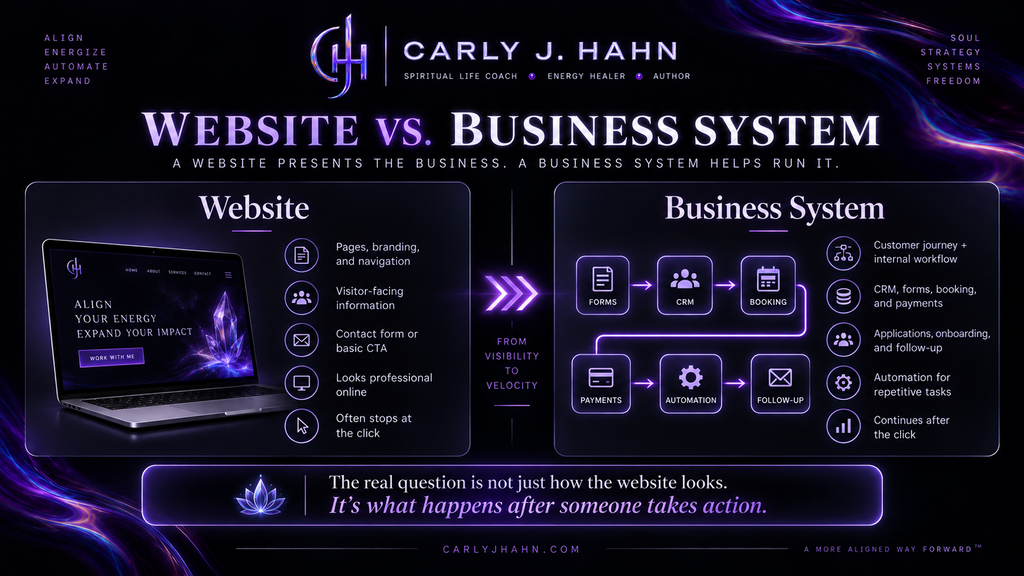
The difference between a web designer and a business systems architect goes far beyond how a website looks. A web designer primarily works on the visitor-facing experience, while a business systems architect examines how the website connects with customer journeys, internal processes, CRM, forms, booking, payments, automation, and the larger operation of the business.
That is the difference between designing a website and architecting a web system.
What Is the Difference Between a Web Designer and a Business Systems Architect?
A web designer primarily focuses on the website itself: its visual presentation, usability, navigation, layout, branding, responsive behavior, and the experience visitors have while using it. Current industry definitions continue to describe web design largely in terms of visual design, user interface, and user experience, while web development is generally associated with the technical functionality underneath the site.
A business systems architect begins with a different question. Instead of asking only what the website needs to look like or what functionality needs to appear on individual pages, the process begins by examining how the business actually operates. The website then becomes one part of a larger system that may include forms, applications, CRM, appointment booking, payments, contracts, onboarding, email communication, internal notifications, memberships, courses, customer portals, and workflow automation.
That difference changes the scope of the project considerably.
| Web design project | Business System architecture |
|---|---|
| Focuses primarily on the website | Focuses on the business and the website |
| Designs the visitor-facing experience | Designs the customer and internal operational experience |
| Builds pages, layouts, navigation, and calls to action | Connects actions to processes that happen afterward |
| May deliver form submissions by email | May route submissions into CRM and automated workflows |
| Functionality can exist as separate tools | Tools are selected and connected intentionally |
| Project may end when the website launches | System is evaluated by how effectively the business operates through it |
Neither role eliminates the need for the other. A web system still needs usable design, and many systems require development. The contrast is the level at which the problem is being examined.
A systems architect is not simply asking, “Can someone submit this form?”
The question becomes, “What needs to happen throughout the business after they submit it?”
A Website Can Work Perfectly and Still Leave the Business Doing Everything Manually
One of the most consistent patterns I have observed across client businesses is a disconnect between what happens on the website and what happens inside the business afterward.
A visitor completes a contact form. The website has successfully done its job.
But then an employee receives an email.
The employee has to create the contact somewhere else, reply manually, send another link, wait for a response, update another system, notify someone else, and remember to follow up three days later.
From the customer’s perspective, the website worked.
From an operational perspective, the website simply handed the work to a human being.
That is where businesses can accumulate an enormous amount of invisible administrative labor. One isolated task may take only a few minutes, so it does not initially look significant. Once the same task occurs repeatedly across dozens or hundreds of customers, multiple employees, and several years, the accumulated cost becomes much easier to see.
Workflow automation platforms themselves are increasingly built around this exact problem. HubSpot, for example, describes workflow automation as connecting repeatable customer actions with automatic record updates, notifications, tasks, routing, and follow-up rather than requiring people to perform those actions manually.
The technology is available.
The harder part is identifying what should be automated in the first place.
Business Systems Architecture Starts With Understanding the Business
Before deciding which plugins, platforms, integrations, or automations a business needs, I first need to understand how that business actually functions.
That means looking at the business from beginning to end rather than beginning with a predetermined technology stack.
A systems discovery process needs to answer questions such as:
- How does someone first become a lead?
- What needs to happen before that person can become a customer?
- Is there an application, qualification, consultation, or approval process?
- What information does the business collect?
- Where is that information currently stored?
- Who needs access to it?
- What happens after someone books or purchases?
- What communication does the customer need?
- What internal actions need to occur?
- Which tasks happen repeatedly?
- Where are employees copying information between systems?
- Where are delays occurring?
- Where does someone have to remember the next step?
- What happens when a process does not follow the normal path?
The answer rarely comes from asking only, “What features do you want on your website?”
A business owner may know that they want online scheduling. That does not necessarily tell me how scheduling needs to interact with payment, CRM records, intake, reminders, internal workflows, or what happens after the appointment.
Systems architecture requires drilling further into the process.
The Problem a Client Describes Is Not Always the Operational Problem
Clients naturally describe problems from the position they occupy inside their business, such as:
- “I need a better website.”
- “I need an application form.”
- “I need online booking.”
- “I need a CRM.”
Those may all be accurate requests. They still do not necessarily identify the larger operational problem.
Across client discovery and implementation, I have repeatedly found that the first request often reveals only one visible part of a larger process. Once the entire workflow is mapped, other problems become apparent: duplicate data entry, unnecessary emails, missing follow-up, disconnected customer records, inconsistent onboarding, or employees performing repetitive tasks because the existing technology was never configured to handle them.
That is why technology selection happens after understanding the process.
Starting with software reverses the order.
The question should not be, “What can this plugin do?”
It should be, “What does this business need to happen?”
Then the appropriate technology can be selected.
Listening Is Part of Systems Architecture
Understanding a business requires considerably more than filling out a discovery questionnaire.
During client conversations, I pay attention to both the information being communicated and how that information is being communicated. Tone changes. Hesitation happens. The same frustration may appear repeatedly in different parts of the conversation. A client may dismiss something as minor while spending ten minutes describing how frequently it creates problems.
Those details matter.
Patterns also appear in what is missing. Someone may explain the beginning and end of a customer process while skipping the three manual steps occurring between them because those steps have become so familiar that they no longer register as unusual.
This is where experience becomes particularly valuable. After working with businesses, websites, marketing processes, customers, and digital tools for decades, repetition becomes easier to recognize. A process that feels completely normal to the business owner may immediately raise another question because I have encountered a similar bottleneck somewhere else.
That observation becomes part of the discovery process.
But there is another layer involved in how I work.
Psychic Sensitivity Has Practical Business Applications
Psychic sensitivity is often discussed as though it belongs exclusively inside explicitly spiritual experiences. That has never matched how psychic perception operates for me.
It also functions during ordinary business conversations.
Information can surface while a client is speaking. Something may pull my attention. A particular statement may feel significant even when the client moves past it quickly. I may become aware that another question needs to be asked or that the explanation being given has another layer underneath it.
That perception does not replace business expertise or technical analysis.
It tells me where to investigate.
The process is therefore not “psychically knowing” what technology someone needs and building something from an intuitive impression. The perception creates another data point. The next step is asking questions, examining the process, identifying the observable pattern, and determining whether the concern is actually present.
In practical terms, several layers operate together:
- Observation: noticing language, tone, repetition, hesitation, omissions, and inconsistencies.
- Pattern recognition: comparing the current situation with recurring patterns observed across previous client work.
- Psychic perception: receiving information or an internal signal that directs attention toward a particular area.
- Investigation: asking additional questions and examining what is actually happening.
- Technical analysis: determining whether the process can or should be changed.
- Implementation: selecting and configuring the technology required to build the resulting workflow.
This is one reason I consider psychic ability far more practical than it is often portrayed.
Sometimes psychic sensitivity does not tell you the answer.
It tells you where to look.
A Web System Has Two Users: The Customer and the Business
Website conversations are frequently dominated by the visitor experience, and understandably so. A visitor needs to understand where they are, what the company offers, whether they trust it, and what action to take next.
But that is only one side of the system.
Every customer action creates an operational consequence for the business.
If the customer submits an application, someone or something needs to process it.
If the customer purchases a service, fulfillment needs to begin.
If the customer schedules an appointment, calendars, reminders, intake, and internal information may need to change.
If the customer cancels, another process begins.
A web system therefore has to be designed from both directions.
The Customer Journey
From the customer’s side, the process should answer basic questions clearly and reduce unnecessary friction. The customer should understand what they are being asked to do, why they are being asked to do it, what information is required, and what happens next.
For example, a service journey might include discovery, service education, qualification, application, approval, payment, scheduling, intake, service delivery, and follow-up. Not every business uses those exact stages, but whatever journey exists should feel coherent to the person moving through it.
The Internal Business Journey
The business experiences the same journey differently.
An application may need to create a CRM record. Payment may need to change a customer status. A booking may need to create an internal notification. An approved client may need access to a portal. A form submission may need to generate a task for a staff member.
Connected form, CRM, and booking workflows are already technically possible through modern website systems. Current implementation guidance increasingly describes forms not merely as email generators but as entry points into broader CRM, scheduling, and onboarding workflows.
The architecture determines how those pieces should work together for the specific business.
The customer’s journey and the internal workflow must meet somewhere.
That meeting point is the system.
Repetitive Tasks Are One of the First Places I Look for Automation
One of the most useful questions during systems discovery is simple:
What are you or your employees doing over and over again?
Repetition does not automatically mean a task should be automated. Some interactions benefit from human judgment, personal communication, or individual attention.
But repetitive administrative actions deserve examination.
Across client businesses, common opportunities frequently appear around activities such as:
- Sending standard confirmation emails.
- Creating or updating customer records.
- Delivering intake forms.
- Sending appointment instructions.
- Notifying staff members.
- Changing customer statuses.
- Sending payment links.
- Providing onboarding information.
- Routing inquiries to the appropriate person.
- Following up when someone does not complete the next step.
- Granting access to memberships, courses, or portals.
- Moving information between tools.
The objective is not automation for the sake of automation.
The objective is to remove unnecessary human labor while preserving human involvement where it has actual value.
A system should not make the customer feel as if they have been trapped inside an automated obstacle course. It should quietly handle predictable processes in the background so the people inside the business can concentrate on the work that actually requires them.
What an Automated Application Process Can Look Like
Applications are a good example because they expose the difference between placing a form on a website and architecting a complete process.
Consider a business that must approve prospective customers before providing a service.
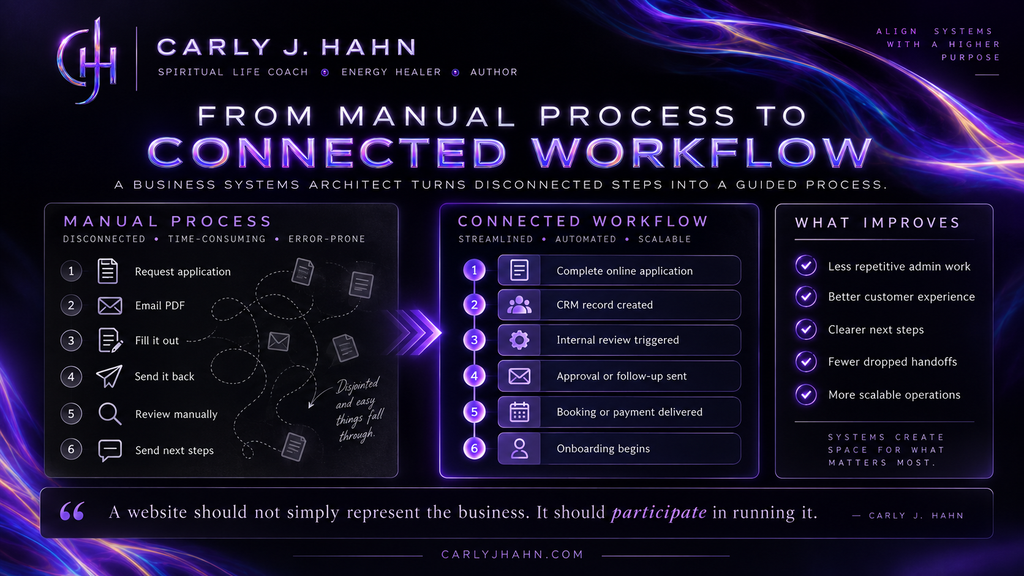
A traditional process might begin when the customer requests an application. An employee emails the document. The customer downloads it, completes it, and sends it back. Someone reviews it, records the decision, sends another email, enters the customer’s information somewhere else, and then provides instructions for payment or scheduling.
Each individual step works.
Collectively, however, the process creates multiple opportunities for delay, lost information, duplicate work, and customer confusion.
A web systems approach begins by mapping the entire journey before building the application.
The Application Becomes the Beginning of a Workflow
The finished system might allow the prospective customer to complete the application directly through the website. Conditional logic can display different questions depending on previous responses, eliminating irrelevant fields and collecting the information actually needed for review.
After submission, the system could then perform several actions depending on the business requirements:
- Create or update the applicant’s CRM record.
- Assign an application status.
- Notify the appropriate employee.
- Send the applicant immediate confirmation.
- Route the application for internal review.
- Request additional information when necessary.
- Trigger an approval or denial process.
- Deliver booking or payment instructions after approval.
- Update internal records as the applicant moves through the process.
The exact workflow will differ from one business to another.
That is why simply installing the same collection of plugins on every website is not systems architecture.
The workflow determines the technology.
Why the Backend Customer Experience Matters
Automation is sometimes evaluated entirely from the company’s perspective.
“How many hours can we save?”
That matters, but it is incomplete.
A badly designed automation can make an internal process efficient while making the customer’s experience miserable.
Customer-facing systems need to consider clarity, communication, response expectations, accessibility, unnecessary steps, repeated questions, and whether people understand what is happening after they take an action.
Someone should not submit a detailed application and then receive an email asking for information they just provided.
They should not complete payment and still wonder whether the company received it.
They should not schedule an appointment and then have to email the company to ask what happens next.
When systems are properly connected, the business and the customer benefit simultaneously.
That is the goal.
Business Systems Architecture Is a Long-Term Business Investment
A properly built web system generally requires a greater initial investment than purchasing a straightforward website.
They are different products.
A conventional website build may include strategy, layout, branding, copy implementation, responsive design, forms, basic functionality, and launch.
Systems architecture can require all of that plus business discovery, workflow mapping, customer journey analysis, data architecture, automation logic, CRM configuration, booking workflows, payment processes, conditional forms, testing, integrations, documentation, and staff training.
The appropriate comparison is therefore not simply the initial price of one website against another.
The larger question is:
What does the existing process cost the business over time?
That cost can appear in several places:
- Employee hours spent on repetitive administration.
- Delays caused by manual handoffs.
- Leads that are not followed up consistently.
- Customer information stored across disconnected platforms.
- Errors created through repeated data entry.
- Staff members becoming the only people who know how a process works.
- Customer frustration caused by unnecessary steps.
- Difficulty increasing volume without increasing administrative labor.
Automation alone does not automatically produce efficiency. Poorly designed technology can simply create a faster mess. The value comes from first understanding the business and then designing the appropriate system around it.
That is why systems architecture is an investment in operations rather than simply an expense associated with website design.
A Web Designer May Have Delivered Exactly What You Purchased
There is an important thing to consider here because web designers are frequently blamed for a problem that was never included in the project.
If a company hired someone to design and build a professional five-page website and that person delivered a professional five-page website, the designer may have completed exactly what was promised.
The problem may be the expectation.
Business owners often use the word “website” to describe something considerably larger than the deliverable being sold. They assume the person building the website will also understand customer acquisition, CRM architecture, automation, intake, scheduling, payments, onboarding, SEO, marketing, and internal operations.
Those skills are not automatically part of web design.
Current web-design comparisons still generally distinguish designers as responsible for visual presentation and user experience and developers as responsible for code and site functionality. Even that difference does not fully address someone whose role is to examine the entire business process and determine how multiple technologies should operate together.
That is why defining the scope before hiring matters.
Do You Need a Web Designer or a Business Systems Architect?
A business primarily needing a visual redesign, improved usability, stronger branding, or a better page experience may need a web designer.
A business requiring custom technical functionality may need a developer.
A business struggling with disconnected tools, repetitive administration, customer handoffs, applications, scheduling, CRM, payments, onboarding, or other processes that need to function together may need systems architecture.
In some projects, one person may provide several of these disciplines.
The title matters less than understanding what problem the person has actually been hired to solve.
The questions a prospective client should ask are therefore not limited to design:
- Ask what happens after the website generates a lead.
- Ask whether forms can connect with the CRM.
- Ask how booking interacts with intake.
- Ask who designs the customer workflow.
- Ask who examines repetitive administrative work.
- Ask what happens after someone purchases.
- Ask whether the person is building a website or evaluating how the website needs to function within the business.
Those answers reveal the real scope of the project.
A Website Should Participate in Running the Business
A website is one of the few pieces of business technology that customers, staff members, marketing systems, payment systems, booking systems, forms, CRM data, and automation can all interact with.
Treating it only as a digital brochure leaves much of that capability unused.
That does not mean every website needs an elaborate automation ecosystem. It means the technology should be appropriate to the business it serves.
After decades of working across marketing, websites, customer behavior, digital tools, and client businesses, the pattern I continue to see is straightforward: the strongest solutions come from understanding the business before building the technology.
That requires listening to what the client says.
It requires noticing what they do repeatedly.
It requires understanding what their customers experience.
It requires examining what happens behind the scenes.
In my work, it also includes the psychic sensitivity that helps me recognize where another question needs to be asked and where a pattern deserves further investigation.
Then the expertise, testing, technology, and implementation determine what gets built.
That is why I no longer think “web designer” accurately describes the work.
The website is only one piece.
The actual work is architecting a system in which the website, technology, customer journey, and internal business processes work together.
Because a website should not simply represent the business.
It should participate in running it.